AVerMedia Live Gamer Ultra 2.1 Review
An external HDMI 2.1 capture card with 4K60 recording, high-refresh HDR and VRR passthrough, USB-C connectivity, headset and controller-audio connections, and claimed 5.1-channel audio support.
Marcus Bell's review
By Marcus Bell ·
Category scores
- Value 3
At AVerMedia’s $209.99 US sale price on September 5, 2026, this costs only $40 less than the $249.99 Elgato 4K X. Buyers using 4K60 displays are paying for bandwidth they will not use, while high-refresh users must weigh the saving against the GC553G2’s configuration caveats.
- Setup and compatibility 3
Basic UVC capture can work immediately, but 5.1 audio, firmware updates, USB-port placement, and fractional refresh rates can require intervention. One Mac owner and one Linux owner have also reported 10 Gbps connections falling back to 5 Gbps.
- Reliability 3
A long recording drifted when one 59.94 Hz source was captured at 60 Hz and remained synchronized once the rates matched. Multiple owner reports also describe audio, device-detection, and firmware-update problems in their particular configurations, making exact setup choices important to stable operation.
- Performance 4
High-refresh HDR and VRR passthrough is the reason to buy it. Windows Central found its tested 4K60 recording visually strong and free of stutters, tearing, or dropped frames. Native P010 10-bit HDR is limited to 4K30, while reported frame-pacing problems in specific high-refresh configurations mean the recorded result may not always match the smooth preview.
- Build quality 3
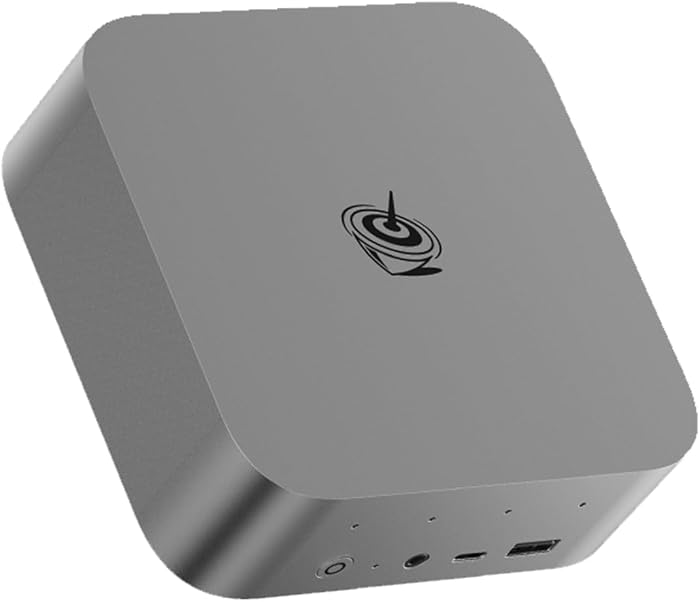
At 115 g, the plastic enclosure is light enough for attached cables to lift or rotate it despite the rubber feet. The published assessment says more about inadequate weight and cable control than long-term physical durability.
The review
The GC553G2 is worth considering at AVerMedia’s listed US sale price of $209.99 on September 5, 2026, if you need 4K120 or 4K144 HDR and VRR passthrough. That is its real advantage over cheaper HDMI 2.0 cards. Windows Central found no noticeable passthrough latency at 4K60, while an independent frame-by-frame test measured the OBS preview three to six frames, or roughly 0.05 to 0.1 seconds, behind the passthrough display. That preview delay is enough to matter in timing-sensitive games. AVerMedia store listing, Windows Central review, KOMUSO Works latency test
On Windows, the GC553G2 can capture up to 4K144 using MJPEG, so its overall capture capability is not limited to 4K60. The important restriction applies specifically to HDR and P010 capture: the AVerMedia manual and Game It’s testing put native P010 capture at 4K30. P010 is a 10-bit 4:2:0 format used for HDR capture. Those sources list 4K60 capture in SDR formats rather than native 10-bit 4K60 HDR recording. Buy this to retain high-refresh HDR on the gaming display while capturing at a lower rate when HDR recording is required. AVerMedia product specifications, AVerMedia user manual, Game It review
One long-recording problem occurred when an owner captured a 59.94 Hz console input at 60 Hz, producing progressive synchronization drift. Selecting 59.94 Hz kept that configuration synchronized for more than three hours. AVerMedia gives the same practical advice: match the capture frame rate exactly to the source, including 59.94 rather than nominal 60 Hz. Owner synchronization report, AVerMedia synchronization guidance
Audio has produced several problems in specific owner configurations. Reports include USB audio trouble requiring the 3.5 mm output and a separate PC line-input source, crackling that changed with USB-port placement, and OBS exposing only stereo activity after a 5.1 configuration. The documented 5.1 failure is the reason to treat multichannel capture as configuration-dependent rather than plug-and-record. USB audio workaround, USB-port crackling report, OBS 5.1 report, AVerMedia 5.1 guidance
macOS support includes a 10 Gbps mode, but AVerMedia’s instructions contradict themselves. The requirements mention macOS Sonoma 14.4 or later, while the setup procedure says to update to macOS 15. One M3 MacBook Pro owner using the supplied cable and current firmware still saw a 5 Gbps connection under macOS 15.1. Switching USB modes can also interrupt preview audio until the software or card is restarted. Treat the Mac path as something to verify on your hardware, not a guaranteed 10 Gbps connection. AVerMedia Mac setup instructions, M3 MacBook Pro owner report
One Linux owner reproduced 5 Gbps rather than 10 Gbps negotiation on Ubuntu and Arch using multiple cables and computers, although that single report is not enough to characterize every Linux configuration. Firmware can be awkward as well. One failed updater led to an intermediate-firmware workaround, while another owner needed RECentral 4 before AVerMedia’s utilities exposed usable downloads. Linux USB report, Firmware update report, Software detection report
Some high-refresh PC configurations have also produced choppy recordings or duplicated and dropped frames at certain 120 and 144 Hz source settings, even when the OBS preview looked smooth. One Minisforum system produced 1440p60 recordings behaving closer to 40 fps, while another system became choppy whenever the source exceeded 60 Hz. These reports make firmware version, USB-controller placement, pixel format, and exact refresh rate relevant troubleshooting variables if a particular setup develops frame-pacing trouble. High-refresh recording reports
The enclosure weighs 115 g and is plastic. Windows Central found that cable tension could lift or rotate it despite the rubber feet. That does not impair capture, but it makes cable routing more important than it should be on a desktop device with HDMI, USB, and audio leads attached. AVerMedia specifications, Windows Central review
At AVerMedia’s $209.99 US sale price on September 5, 2026, these compromises are defensible for a 4K120 or 4K144 HDR and VRR setup, though the value proposition is less aggressive than it would be at a deeper discount. For a 4K60 display or 1080p60 stream, HDMI 2.1 buys very little and a cheaper HDMI 2.0 card is the better purchase. The Elgato 4K X is the obvious step-up alternative if its $249.99 US price on the same date is acceptable, particularly for buyers who want its broader high-frame-rate capture specification. AVerMedia store listing, Elgato 4K X listing
The verdict
What works
- It preserves 4K120 or 4K144 HDR and VRR on supported passthrough displays while capturing at a lower rate.
- Owners report good 4K60 SDR picture quality when the source, format, and USB connection are correctly configured.
- Owners find the headset, controller-chat, ultrawide, and 5.1 features useful for more involved capture setups.
- AVerMedia’s $209.99 US sale price on September 5, 2026, is $40 below the Elgato 4K X’s $249.99 price.
What doesn't
- Native P010 10-bit HDR capture is limited to 4K30, despite Windows MJPEG capture reaching higher resolutions and frame rates.
- Owners have reported USB audio that crackles, disappears, or requires a separate analog line-input workaround in particular configurations.
- Capturing a 59.94 Hz source at 60 Hz caused progressive audio and video drift in the documented long-recording test.
- The 115 g plastic enclosure can be moved by cable tension, while one tested Mac setup and one owner’s unofficial Linux tests produced 5 Gbps rather than 10 Gbps USB negotiation.
- Buy it if
- Console or PC players who use a 4K120 or 4K144 HDR and VRR display and want to preserve that display signal while recording at a lower rate.
- Skip it if
- Streamers limited to 4K60 displays or 1080p60 output, Linux users who require verified 10 Gbps operation, and buyers who need dependable multichannel audio without USB or OBS troubleshooting should choose another card.
Frequently asked questions
Can the AVerMedia GC553G2 capture 4K60 HDR in 10-bit?
Unrestricted native 10-bit 4K60 capture is not confirmed by the cited specifications and testing. P010 10-bit HDR capture is listed at 4K30, while 4K60 is available in SDR formats such as NV12. Windows MJPEG capture can reach higher resolutions and frame rates, but that does not remove the P010 HDR restriction.
Does the GC553G2 add input lag?
Windows Central found no noticeable passthrough latency during its 4K60 testing. A separate frame-by-frame test measured the OBS preview three to six frames behind the passthrough display, so timing-sensitive games should use the passthrough display rather than the software preview.
How do I prevent audio and video drift in long recordings?
Match the capture rate exactly to the source. AVerMedia specifically identifies PlayStation 4, PlayStation 5, and Xbox Series X/S as systems that may output 59.94 Hz while displaying a nominal 60 Hz setting, and selecting 59.94 kept the documented owner test synchronized for more than three hours.
Is the GC553G2 worth buying for a 4K60 setup?
Usually not. Its meaningful advantage is retaining 4K120 or 4K144 HDR and VRR on the passthrough display, so a cheaper HDMI 2.0 capture card is normally better value for 4K60 displays and 1080p60 streams.
Does the GC553G2 support 10 Gbps on Mac, and what happens on Linux?
AVerMedia documents a 10 Gbps mode for supported Macs, although one M3 MacBook Pro owner still measured a 5 Gbps connection with the supplied cable and current firmware. AVerMedia does not establish official Linux support in the cited material. Separately, one owner’s unofficial Linux testing produced 5 Gbps negotiation across Ubuntu, Arch, multiple cables, and multiple computers.
Ready to buy the AVerMedia Live Gamer Ultra 2.1?
Check price at Amazon →


Comments
No comments yet — be the first to share your experience with the AVerMedia Live Gamer Ultra 2.1.